Create your WordPress site with AI in 60 seconds.






















You can manage all your websites from a single place through cPanel and check their files and settings. If you have the right to create multiple websites in the package you purchased, you can follow the steps below.
- First, log in to your customer panel and then access cPanel. Click here to learn how to log in to cPanel.
- On the cPanel home page, under the “Domains” section, click on the “Domains” option.

- Click the “Create A New Domain” button.

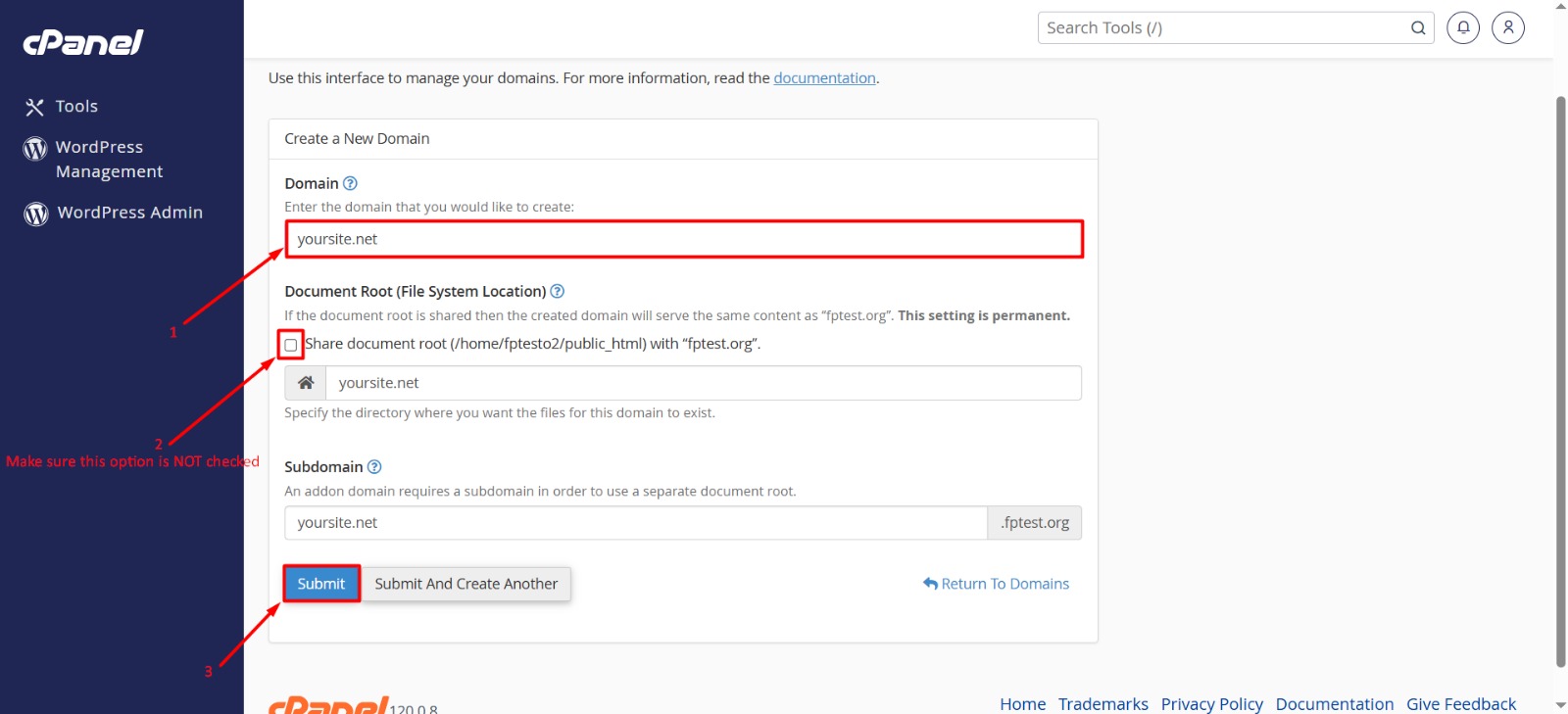
- Enter the domain name you want to create here. For example: yoursite.net.
- Make sure this option is NOT checked: Share document root (/home/USERNAME/public_html)
- After making all your adjustments, click the “Submit” button. This process may take a few seconds. You will receive a confirmation message when the new domain is successfully added.
- Once your website is created, you can upload files for this new domain, design your website, or install a CMS (such as WordPress).